



















Primary Math
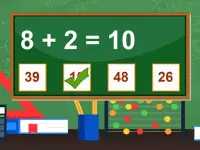
Primary Math brings fast-paced number fun to your phone. This arcade-style game challenges you to solve addition and subtraction problems quickly. You tap answers on the screen to progress, making it a great pick for quick sessions. It is straightforward and really fast, perfect for anyone wanting a simple skill test.
What Stands Out
Primary Math is a simple, quick-answer mobile game that focuses on basic arithmetic. Its core appeal is speed, as you must solve problems rapidly to advance. The controls are minimal, letting you click answer options instantly. The game checks both speed and correctness, giving immediate feedback. It features simple buttons and options to go back or restart if you make a mistake. This math game is ideal for kids and anyone looking to sharpen their mental math skills in a fun, arcade-like setting.
Player Questions
How do I control Primary Math?
You control the game by clicking or tapping the answer options directly on the screen. There are no complex inputs, just simple taps to select your response and keep the game moving.
What is the main goal in Primary Math?
The main goal is to select the correct answer to addition and subtraction problems as quickly as possible. Your speed and accuracy determine how far you progress through the game.
Can I fix mistakes in Primary Math?
Yes, the game provides simple buttons to go back or restart after an error. This lets you correct a wrong answer and try the problem again without losing your progress.
How does Primary Math test my skills?
The game tests your mental math speed by presenting problems that require fast tapping. It sometimes introduces obstacles that challenge your reaction time, making practice essential for improvement.
Getting Started
To begin, open the game on your phone and you will see a math problem with multiple answer choices. Tap the correct answer quickly to move to the next problem. Keep progressing through the levels by maintaining your speed and accuracy. The game responds instantly to your input, so stay focused and use the on-screen buttons to manage any mistakes.
Ways to Play Better
Focus on tapping the right answer fast to beat the clock. Practice using the buttons quickly and stay calm to avoid errors. Use the restart option to learn from mistakes and improve your overall speed in this fun skill game.
What Stands Out
Primary Math brings quick number challenges to your phone. This arcade-style game pushes you to solve addition and subtraction problems at a fast pace. You tap answers Math Games on the screen to advance, making it a great fit for short sessions. The gameplay is direct and speedy, ideal for anyone wanting a simple skill test.
About this game
- Supported devices
- Desktop
- Genre
- Arcade
- Release date
- 11 April 2018
- Rating
- No ratings yet
Cool Information & Statistics
Since arriving on April 11, 2018, Primary Math has recorded 10 plays. It is still waiting for its first player rating. Solve addition and subtraction problems quickly by tapping the correct answers to progress through fast-paced rounds. Find more browser games on Kizi10.org, from newly published choices in New Games and selected picks in Best Games to refreshed titles in Updated Games.
Math Game

Fun Monster Trucks Jigsaw
Happy Easter Memory

CraftBox Jigsaw Puzzle

Craftsman Hidden Items

Buddy Jigsaw Puzzle
Hangman Challenge

Dino Fun Adventure

Funny Balloons

Rooms Hidden Numbers

Flappy Red Ball

Spot the Difference Animals

Winter Memory

Kids Cooking Chefs Jigsaw

Which Is Different Cartoon
Little Archer

Funny Face Jigsaw

Optical Illusion

Quick Color Dice
Cute Cat Room Differences

Millionaire

Winter Holiday Puzzles
Brick Out Adventure

High Jump


