



















Fast Food Restaurant
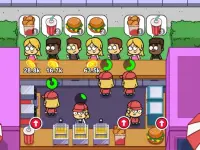
Jump into the browser game Fast Food Restaurant and test your multitasking skills. You click fast to restock ingredients, design menus, and manage staff while keeping customers happy. Upgrades and quick reactions are key to success, and the free version lets you unlock decorations without spending anything.
What Stands Out
This fast food game delivers chaotic, fast-paced fun. You handle drag-and-drop layout changes, deploy staff with precise clicks, and upgrade kitchen tools to speed up service. The interface can feel cluttered, but the rush of peak hours makes every decision count. Balancing limited resources while juggling orders creates a rewarding challenge that keeps you hooked. It captures the essence of a busy eatery simulation with a casual, arcade-style twist.
Player Questions
How do I upgrade equipment in Fast Food Restaurant?
Click the upgrade icons for kitchen tools first to speed up service. This directly affects customer satisfaction and helps you handle peak hours more efficiently.
What controls are used to play Fast Food Restaurant?
The game relies on rapid mouse clicks for restocking, staff deployment, and menu updates. Drag-and-drop is used for organizing layouts, though controls can sometimes feel sticky.
Can I unlock decorations for free in Fast Food Restaurant?
Yes, the free version lets you unlock decorations and upgrades without buying anything. Replay levels to learn mechanics and avoid slow progress from costly purchases.
Why is managing staff deployment so challenging?
Staff management is tough because you must balance multiple tasks during hectic peak hours. Clicking icons to adjust staff while restocking ingredients demands lightning-fast decisions.
Getting Started
Begin by designing your restaurant layout using drag-and-drop. Focus on upgrading kitchen tools first to boost service speed. Then deploy staff by clicking icons and restock ingredients quickly. Keep an eye on customer flow during peak hours. Use the pause button to plan moves. The interface groups controls, so stay focused to avoid getting lost in the chaos.
Ways to Play Better
Prioritize kitchen upgrades early. Use rapid clicking during bursts to handle orders fast. Replay levels to master mechanics and learn how to balance resources. Keep your mouse ready for intense moments and always watch customer satisfaction to stay ahead.
What Stands Out
Fast Food Restaurant delivers chaotic, fast-paced fun. You handle drag-and-drop layout changes, deploy staff with precise clicks, and upgrade kitchen tools to speed up service. The interface can feel cluttered, but the rush of Chinese California Truck - Fast Food Cooking Game peak hours makes every decision count. Balancing limited resources while juggling orders creates a rewarding challenge that keeps you hooked. It captures the essence of a busy eatery simulation with a casual, arcade-style twist.
About this game
- Supported devices
- Desktop
- Genre
- Cooking
- Release date
- 05 August 2018
- Rating
- No ratings yet
Cool Information & Statistics
Fast Food Restaurant joined the catalog on August 5, 2018 and has received 17 plays. It is still waiting for its first player rating. Experience the chaotic fun of managing a fast-paced restaurant by quickly clicking to restock ingredients, design menus, and keep customers happy. Kizi10.org brings together varied browser games; find recent arrivals in New Games, notable choices in Best Games, and refreshed releases in Updated Games.
Dr Panda Restaurant

Pizza maker cooking and baking games for kids

Rainbow Frozen

Biryani Recipes and Super Chef Cooking Game
Pizza Maker
Scary Vending Machine

Strawberry Shortcake Sweet Shop
Food Truck Chef™ Cooking Games
Cooking Korean Lesson

World Best Cooking Recipes

Super Burger 2

Chinese California Truck - Fast Food Cooking Game

Yummy Churros Ice Cream

Asmr Slicing
Yummy Super Burger

Fried Noodles

Carrot Cake

Kitty Lunchbox

Sweet Cotton Candy Maker

Yummy Waffle Ice Cream
Cooking In The Kitchen
Yummy Toast

Yummy Super Pizza
Idle Restaurant Tale


